NEW Copilot that does the task with you

Your operations, written once. Followed everywhere.

Ops Navigator turns scattered documents, recorded workflows and tribal know-how into structured SOPs, guided journeys and an in-app copilot — so every branch, every new hire, every time, does it the right way.

Self-serve setup in minutes · No credit card to start

Workspace · KAYO Education
Ops Navigator workspace home with active journeys, pending acknowledgements and AI review queue
Handbook → 8 SOP stepsStructured by Caprics AI
Teacher onboarding · 76%24 assigned this week
92% franchise compliance14 branches in sync

Built for teams that run on repeatable process

Schools & education groupsFranchise networksFront-office teamsAdmissions & fee desksTraining & L&DMulti-branch operationsCustomer supportCompliance & audit Schools & education groupsFranchise networksFront-office teamsAdmissions & fee desksTraining & L&DMulti-branch operationsCustomer supportCompliance & audit
How it works

From messy know-how to a running playbook.

Six steps, one workspace. Scroll through the lifecycle — the product moves with you.

01 · Capture

Record a workflow once. Get every step for free.

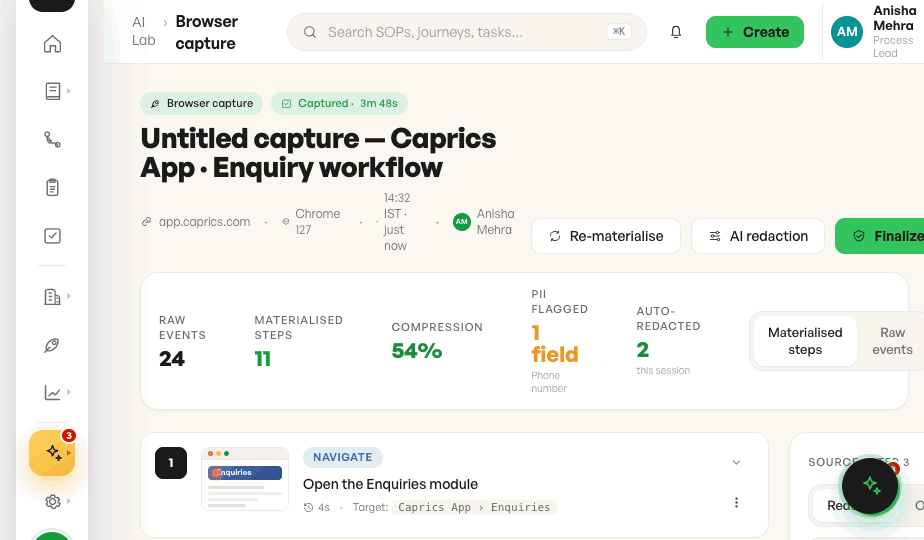
Click through a task in your own app with the browser extension. Every click, field and screen becomes a materialised step — with personal data redacted before anyone sees it.

  • Raw events compressed into clean steps
  • AI-proposed blur for names, faces, IDs
  • Promote straight to a draft SOP
Browser capture review
02 · Structure

Drop in the handbook. Caprics AI writes the SOPs.

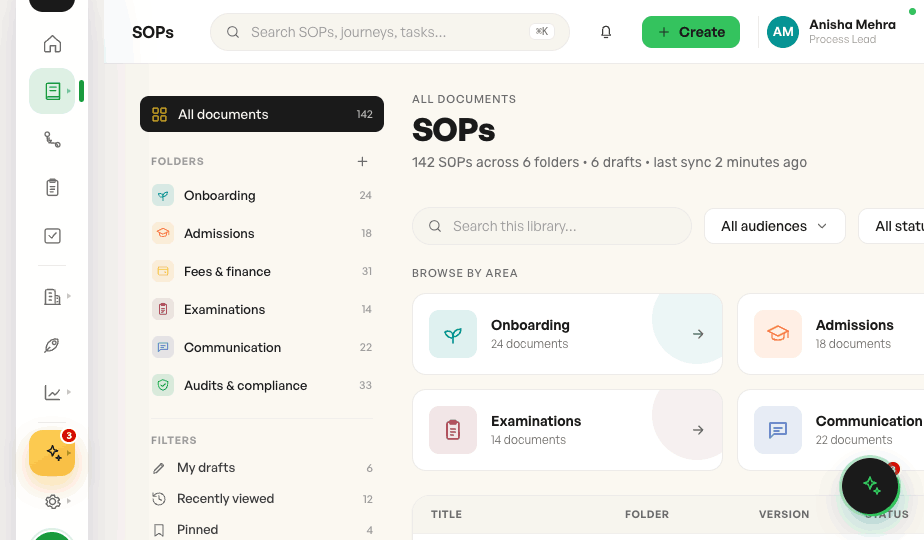
Upload PDFs, docs and old manuals. AI granularises them into versioned, step-by-step SOPs, organised into folders by area — ready for review, not rewriting.

  • Folders by area: admissions, fees, exams…
  • Version history on every document
  • Audience tags and drafts workflow
SOP library
03 · Guide

Turn SOPs into journeys people actually finish.

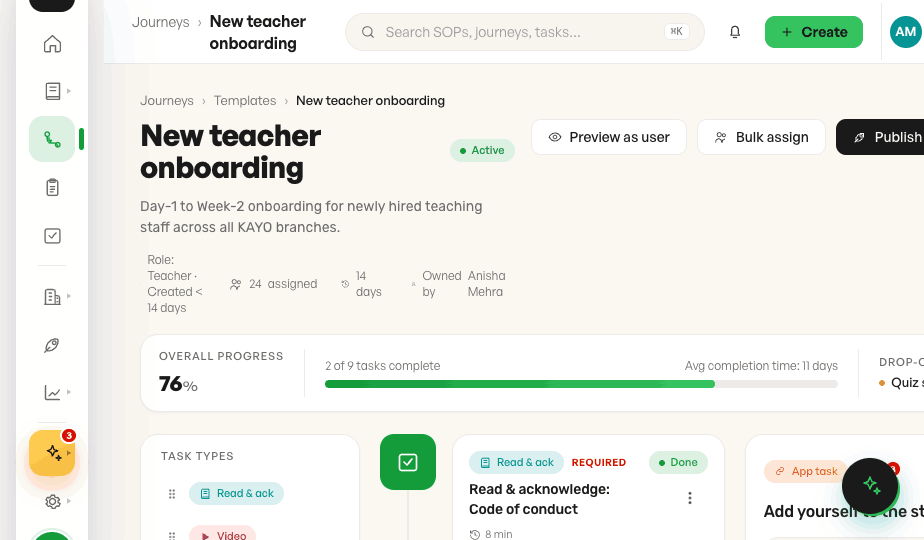
Assemble onboarding and training journeys from read-and-acknowledge docs, videos, quizzes and real app tasks. Assign by role, track progress, spot the drop-off.

  • Required acknowledgements with audit trail
  • Bulk assign across branches
  • Completion time and drop-off insight
Journey builder
04 · Publish

Author once. Publish to every audience.

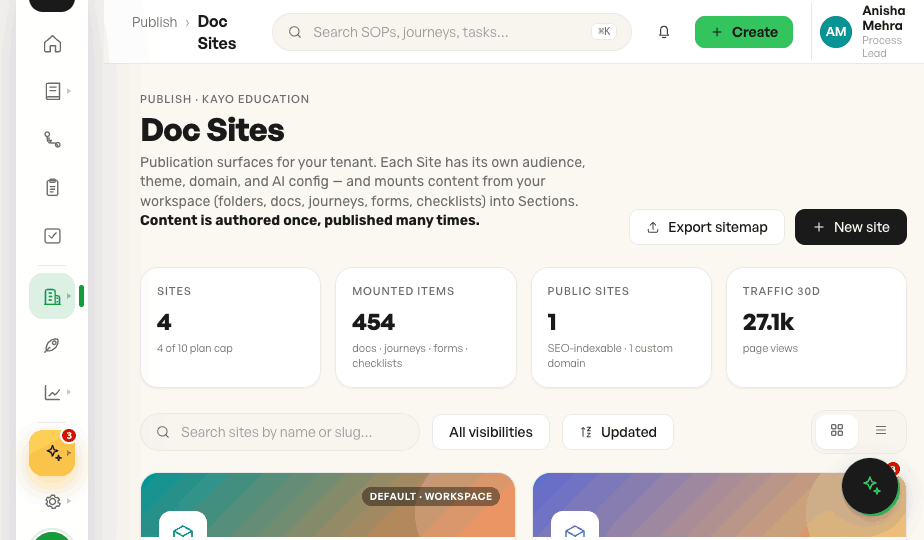
Mount folders, journeys and checklists into Doc Sites — each with its own theme, domain and AI config. Section-level access means the right people see the right pages.

  • Public, link-only or private sites
  • Restrict a section or a single document
  • Custom domains and sitemaps
Doc sites
05 · Assist

A copilot that answers — and does it with you.

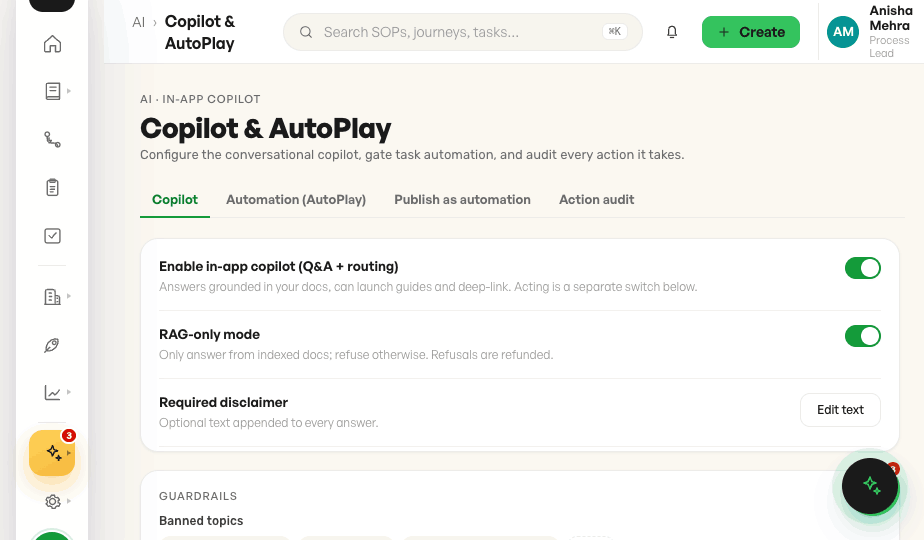
Staff ask in plain words and get grounded answers with citations. For routine tasks, AutoPlay shows its plan, asks before every risky step, and stops the moment anything looks off.

  • Answers only from your own content
  • Per-step confirmation and a hard stop
  • Every action logged for audit
Copilot and AutoPlay settings
06 · Measure

See what's read, followed and skipped.

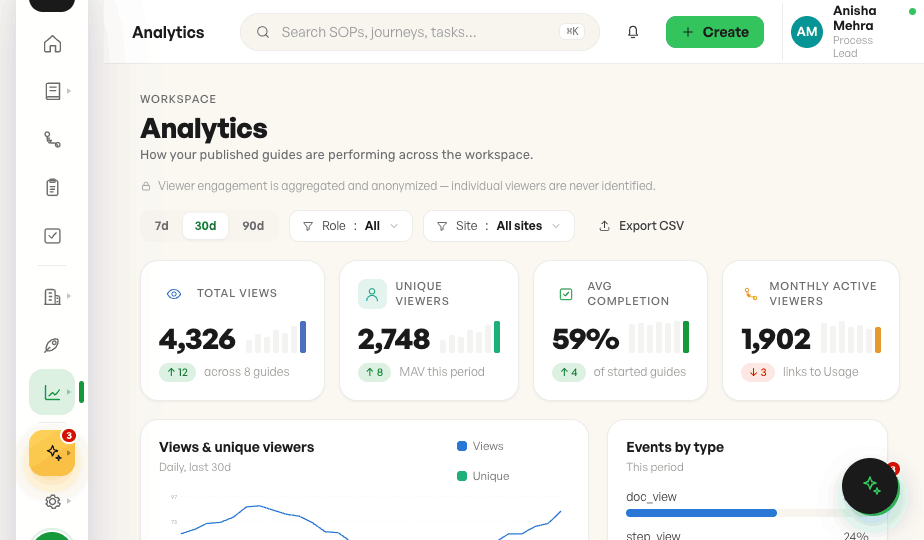
Per-guide engagement, completion funnels and AI-question gaps show which processes work and which need a rewrite — aggregated and anonymised, never individual surveillance.

  • Views, completion and time per guide
  • Step-level drop-off funnels
  • Top searches and unanswered questions
Content analytics
AI Lab · Browser capture
Browser capture review screen
SOP library screen
Journey builder screen
Doc sites screen
Copilot and AutoPlay screen
Analytics screen
The platform

Process docs are the start. Adoption is the point.

Ops Navigator goes past the library — guiding people inside the tools they already use, and showing you how those tools are really used.

Digital adoption

Guidance that lives inside your app.

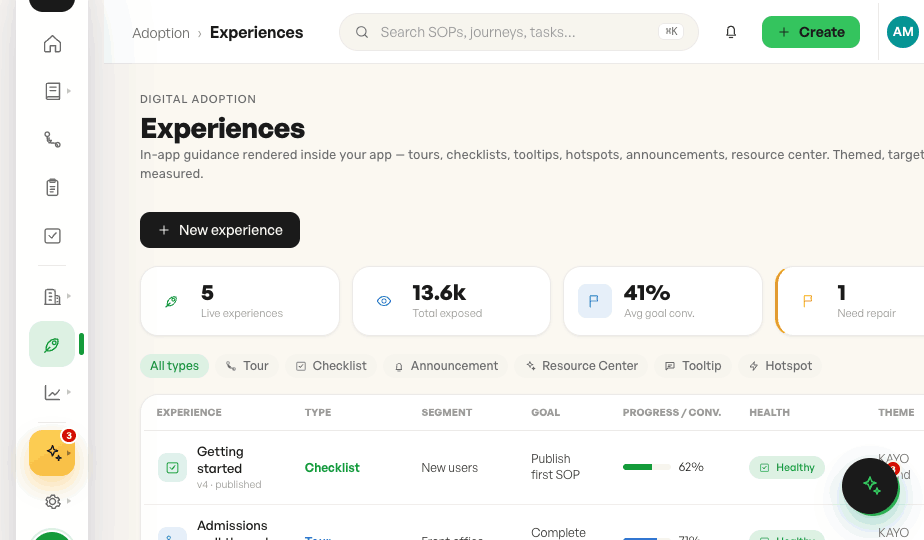
Build tours, checklists, tooltips, hotspots, announcements and a resource center that appear right where work happens. Target by role or behaviour, theme to your brand, and tie each experience to a goal.

Six experience typesTour to resource center
Audience targetingSegments by role and behaviour
Brand themingYour colours, or inherit the host
Goal trackingCompletion and conversion
Adoption · Experiences
Digital adoption experiences list
Product analytics

Know how your app is really used.

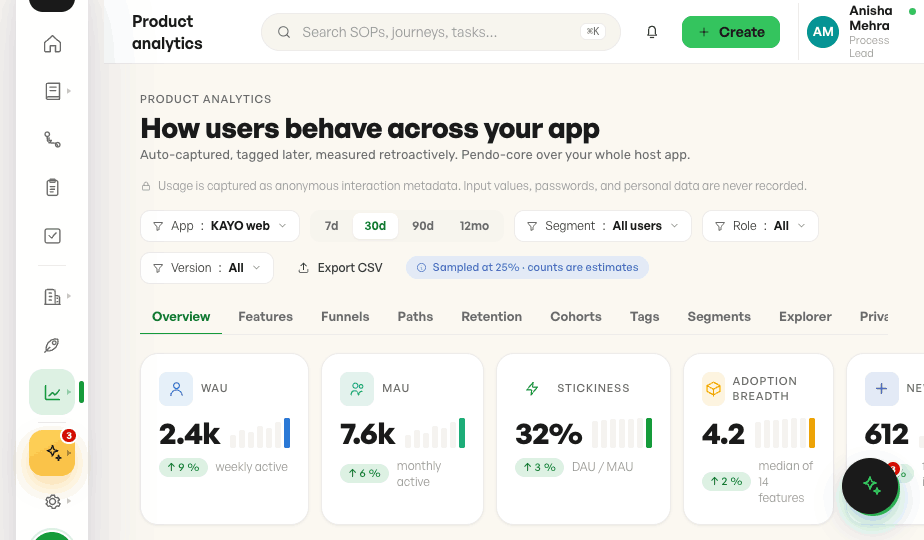
Auto-captured, tag-later analytics for your whole host app: feature adoption, funnels, paths, retention and cohorts — with sampling and privacy posture always visible, and input values never captured.

WAU, MAU, stickinessWith period deltas
Funnels & pathsWhere users drop off
Retention cohortsWeek-over-week grids
Tag retroactivelyDefine features after the fact
Analytics · Product analytics
Product analytics overview
Built in

The everyday details, already handled.

The operational, admin and governance features your team reaches for every day.

01

Version history

Compare and restore any SOP version, with who changed what and when.

02

Command palette

Jump to any SOP, journey or task from anywhere with ⌘K.

03

Franchise compliance

See which branches are in sync and which are drifting.

04

Escalations

Route questions the docs can't answer to the right owner.

05

Templates

Start journeys and SOPs from proven, reusable structures.

06

Custom branding

Your logo, colours and sign-in screen across the workspace.

07

Roles & permissions

Fine-grained roles, grants and an access debugger for admins.

08

AI credits metering

Transparent usage across capture, granularising and copilot.

09

Acknowledgements

Required read-and-ack with a tamper-evident audit trail.

10

Multi-workspace

Separate tenants and workspaces with their own rules.

11

Invite & bulk import

Bring staff in by CSV; they set a password and they're in.

12

Light & dark

A calm interface that's easy on the eyes, day or night.

Trust

Private by default. Careful by design.

Process data is sensitive. Ops Navigator is built to protect the people in it — and to never act without a human in charge.

PII redaction with a privacy floor

Emails, phone numbers and amounts are always blurred in captures; AI proposes the rest for review before anything is baked.

Access down to the document

Doc site, section and document levels cascade cleanly — a restricted section stays restricted.

Humans confirm, everything is logged

AutoPlay asks before destructive steps and records every action, so your team always knows what was done and why.

Aggregated, anonymised analytics

Engagement is reported in aggregate. Individual viewers are never identified, and input values are never captured.

FAQ

Questions, answered.

Can't find yours? Start a workspace and ask the copilot — or write to the Caprics team.

What is Ops Navigator?+

Ops Navigator is a process and knowledge platform. It turns documents and recorded workflows into structured SOPs, assembles them into guided journeys, publishes them to doc sites, and adds an in-app copilot and adoption layer on top.

How long does setup take?+

Self-serve onboarding takes a few minutes: create your account, verify your email, name your workspace and invite your team. You can upload your first handbook straight away.

Do I have to rewrite our existing documents?+

No. Upload what you have — PDFs, Word files, old manuals. Caprics AI breaks them into step-by-step SOPs for you to review and approve.

Will the copilot act without asking?+

Never on anything risky. AutoPlay is off by default, shows its full plan first, asks for confirmation on destructive steps, and stops and hands back to you under any uncertainty.

Does it work for franchise and multi-branch teams?+

Yes. Publish one source of truth across branches, track compliance per franchisee, and tailor doc sites and access per audience.

Can it match our brand?+

Bring your logo, colours and sign-in screen. Doc sites and in-app experiences can carry your theme or inherit your host app's styling.

Get started

Put your playbook to work today.

Set up your workspace in minutes. Upload one handbook and watch it become a process your whole team can follow.